%22%2F%3E%3Crect%20width%3D%22800%22%20height%3D%22450%22%20rx%3D%2228%22%20fill%3D%22url(%23g-liberty-open-threshold-r)%22%2F%3E%3Cg%3E%3Crect%20x%3D%22220%22%20y%3D%2265%22%20width%3D%22360%22%20height%3D%22320%22%20rx%3D%2228%22%20fill%3D%22none%22%20stroke%3D%22%23F1C66D%22%20stroke-opacity%3D%22.72%22%20stroke-width%3D%2212%22%2F%3E%3Cpath%20d%3D%22M400%2070V380M225%20225H575%22%20fill%3D%22none%22%20stroke%3D%22%23F1C66D%22%20stroke-opacity%3D%22.72%22%20stroke-width%3D%2212%22%2F%3E%3Ccircle%20cx%3D%22494%22%20cy%3D%22145%22%20r%3D%2240%22%20fill%3D%22%23F1C66D%22%20fill-opacity%3D%22.32%22%2F%3E%3C%2Fg%3E%3Cpath%20d%3D%22M0%20410C180%20350%20610%20470%20800%20360V450H0Z%22%20fill%3D%22%2307101E%22%20fill-opacity%3D%22.35%22%2F%3E%3C%2Fsvg%3E)
Opening frame01
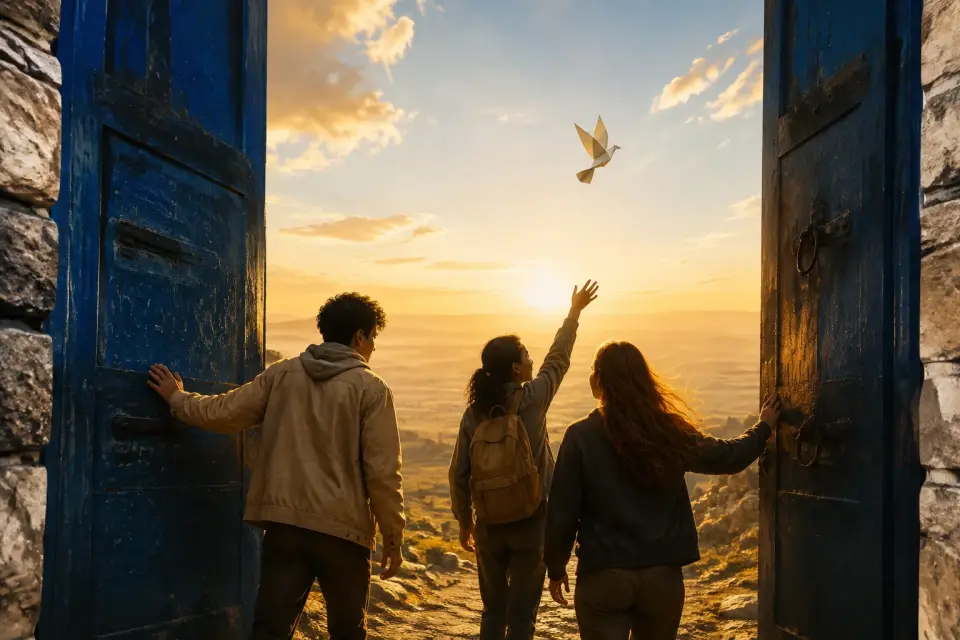
The Open Threshold
A restrained opening image where morning light crosses an unlocked doorway into an unknown public space.
Media role · opening-frame


Explore freedom through movement, place, civic life, and personal choice. Start from an original visual direction, write a clear point of view, and carry it into Studio.
This inspiration page does not generate video or use credits.
Category direction
Liberty
Original concept gallery
Each concept has a distinct narrative purpose, media role, composition, and rights-safe generation brief. No political figure, protected symbol, stock person, or competitor media is used.
A restrained opening image where morning light crosses an unlocked doorway into an unknown public space.
Media role · opening-frame
%22%2F%3E%3Crect%20width%3D%22800%22%20height%3D%22450%22%20rx%3D%2228%22%20fill%3D%22url(%23g-liberty-unfolding-map-r)%22%2F%3E%3Cg%3E%3Cpath%20d%3D%22M100%20350H250V275H400V200H550V125H700%22%20fill%3D%22none%22%20stroke%3D%22%23F2B84B%22%20stroke-opacity%3D%22.72%22%20stroke-width%3D%2212%22%2F%3E%3Ccircle%20cx%3D%22100%22%20cy%3D%22350%22%20r%3D%2224%22%20fill%3D%22%23F2B84B%22%2F%3E%3Ccircle%20cx%3D%22700%22%20cy%3D%22125%22%20r%3D%2224%22%20fill%3D%22%23F2B84B%22%2F%3E%3C%2Fg%3E%3Cpath%20d%3D%22M0%20410C180%20350%20610%20470%20800%20360V450H0Z%22%20fill%3D%22%2309242B%22%20fill-opacity%3D%22.35%22%2F%3E%3C%2Fsvg%3E)
A paper landscape expands into multiple paths, turning freedom of movement into a tactile visual metaphor.
Media role · motion-study
%22%2F%3E%3Crect%20width%3D%22800%22%20height%3D%22450%22%20rx%3D%2228%22%20fill%3D%22url(%23g-liberty-shared-square-r)%22%2F%3E%3Cg%3E%3Cellipse%20cx%3D%22400%22%20cy%3D%22225%22%20rx%3D%22292%22%20ry%3D%22150%22%20fill%3D%22none%22%20stroke%3D%22%23B6C8EF%22%20stroke-opacity%3D%22.72%22%20stroke-width%3D%2212%22%2F%3E%3Crect%20x%3D%22338%22%20y%3D%2288%22%20width%3D%22124%22%20height%3D%22274%22%20rx%3D%2262%22%20fill%3D%22%23B6C8EF%22%20fill-opacity%3D%22.16%22%2F%3E%3Ccircle%20cx%3D%22400%22%20cy%3D%22225%22%20r%3D%2222%22%20fill%3D%22%23B6C8EF%22%2F%3E%3C%2Fg%3E%3Cpath%20d%3D%22M0%20410C180%20350%20610%20470%20800%20360V450H0Z%22%20fill%3D%22%23111827%22%20fill-opacity%3D%22.35%22%2F%3E%3C%2Fsvg%3E)
An overhead civic space uses paths, benches, and open edges to show access without relying on national symbols.
Media role · world-detail
%22%2F%3E%3Crect%20width%3D%22800%22%20height%3D%22450%22%20rx%3D%2228%22%20fill%3D%22url(%23g-liberty-handmade-radio-r)%22%2F%3E%3Cg%3E%3Crect%20x%3D%2290%22%20y%3D%22105%22%20width%3D%22120%22%20height%3D%22240%22%20rx%3D%2228%22%20fill%3D%22%23F0D48C%22%20fill-opacity%3D%22.16%22%2F%3E%3Crect%20x%3D%22250%22%20y%3D%2270%22%20width%3D%22120%22%20height%3D%22310%22%20rx%3D%2228%22%20fill%3D%22%23F0D48C%22%20fill-opacity%3D%22.28%22%2F%3E%3Crect%20x%3D%22410%22%20y%3D%22125%22%20width%3D%22120%22%20height%3D%22200%22%20rx%3D%2228%22%20fill%3D%22%23F0D48C%22%20fill-opacity%3D%22.42%22%2F%3E%3Crect%20x%3D%22570%22%20y%3D%2290%22%20width%3D%22120%22%20height%3D%22270%22%20rx%3D%2228%22%20fill%3D%22%23F0D48C%22%20fill-opacity%3D%22.2%22%2F%3E%3C%2Fg%3E%3Cpath%20d%3D%22M0%20410C180%20350%20610%20470%20800%20360V450H0Z%22%20fill%3D%22%23281A16%22%20fill-opacity%3D%22.35%22%2F%3E%3C%2Fsvg%3E)
An anonymous maker assembles a small radio, grounding free expression in a personal act of craft.
Media role · character-beat
%22%2F%3E%3Crect%20width%3D%22800%22%20height%3D%22450%22%20rx%3D%2228%22%20fill%3D%22url(%23g-liberty-blue-hour-bridge-r)%22%2F%3E%3Cg%3E%3Cpath%20d%3D%22M80%20370%20Q400%2040%20720%20370%22%20fill%3D%22none%22%20stroke%3D%22%238FC9E8%22%20stroke-opacity%3D%22.72%22%20stroke-width%3D%2212%22%2F%3E%3Ccircle%20cx%3D%22400%22%20cy%3D%22270%22%20r%3D%2234%22%20fill%3D%22%238FC9E8%22%20fill-opacity%3D%22.32%22%2F%3E%3C%2Fg%3E%3Cpath%20d%3D%22M0%20410C180%20350%20610%20470%20800%20360V450H0Z%22%20fill%3D%22%2307172B%22%20fill-opacity%3D%22.35%22%2F%3E%3C%2Fsvg%3E)
A fictional pedestrian bridge turns an ordinary crossing into a quiet story about connection and mobility.
Media role · atmosphere
%22%2F%3E%3Crect%20width%3D%22800%22%20height%3D%22450%22%20rx%3D%2228%22%20fill%3D%22url(%23g-liberty-erased-sentence-r)%22%2F%3E%3Cg%3E%3Cpath%20d%3D%22M400%20225L92%2074M400%20225L62%20225M400%20225L92%20376M400%20225L708%2074M400%20225L738%20225M400%20225L708%20376%22%20fill%3D%22none%22%20stroke%3D%22%23E6B8FF%22%20stroke-opacity%3D%22.72%22%20stroke-width%3D%2212%22%2F%3E%3Ccircle%20cx%3D%22400%22%20cy%3D%22225%22%20r%3D%2258%22%20fill%3D%22%23E6B8FF%22%20fill-opacity%3D%22.28%22%2F%3E%3C%2Fg%3E%3Cpath%20d%3D%22M0%20410C180%20350%20610%20470%20800%20360V450H0Z%22%20fill%3D%22%23160F24%22%20fill-opacity%3D%22.35%22%2F%3E%3C%2Fsvg%3E)
Ink disappears from a page, then reappears as light—an immediate hook about voice, memory, and expression.
Media role · story-hook
%22%2F%3E%3Crect%20width%3D%22800%22%20height%3D%22450%22%20rx%3D%2228%22%20fill%3D%22url(%23g-liberty-choice-cuts-r)%22%2F%3E%3Cg%3E%3Crect%20x%3D%2290%22%20y%3D%22105%22%20width%3D%22120%22%20height%3D%22240%22%20rx%3D%2228%22%20fill%3D%22%23ED7E56%22%20fill-opacity%3D%22.16%22%2F%3E%3Crect%20x%3D%22250%22%20y%3D%2270%22%20width%3D%22120%22%20height%3D%22310%22%20rx%3D%2228%22%20fill%3D%22%23ED7E56%22%20fill-opacity%3D%22.28%22%2F%3E%3Crect%20x%3D%22410%22%20y%3D%22125%22%20width%3D%22120%22%20height%3D%22200%22%20rx%3D%2228%22%20fill%3D%22%23ED7E56%22%20fill-opacity%3D%22.42%22%2F%3E%3Crect%20x%3D%22570%22%20y%3D%2290%22%20width%3D%22120%22%20height%3D%22270%22%20rx%3D%2228%22%20fill%3D%22%23ED7E56%22%20fill-opacity%3D%22.2%22%2F%3E%3C%2Fg%3E%3Cpath%20d%3D%22M0%20410C180%20350%20610%20470%20800%20360V450H0Z%22%20fill%3D%22%23081323%22%20fill-opacity%3D%22.35%22%2F%3E%3C%2Fsvg%3E)
Four everyday decisions use distinct colors and framing to create a concise, mobile-first social sequence.
Media role · social-cut
%22%2F%3E%3Crect%20width%3D%22800%22%20height%3D%22450%22%20rx%3D%2228%22%20fill%3D%22url(%23g-liberty-room-without-walls-r)%22%2F%3E%3Cg%3E%3Ccircle%20cx%3D%22400%22%20cy%3D%22225%22%20r%3D%22146%22%20fill%3D%22none%22%20stroke%3D%22%23CBE2F4%22%20stroke-opacity%3D%22.72%22%20stroke-width%3D%2212%22%2F%3E%3Ccircle%20cx%3D%22400%22%20cy%3D%22225%22%20r%3D%2272%22%20fill%3D%22%23CBE2F4%22%20fill-opacity%3D%22.18%22%2F%3E%3Cpath%20d%3D%22M400%2045V405M220%20225H580%22%20fill%3D%22none%22%20stroke%3D%22%23CBE2F4%22%20stroke-opacity%3D%22.72%22%20stroke-width%3D%2212%22%2F%3E%3C%2Fg%3E%3Cpath%20d%3D%22M0%20410C180%20350%20610%20470%20800%20360V450H0Z%22%20fill%3D%22%23091322%22%20fill-opacity%3D%22.35%22%2F%3E%3C%2Fsvg%3E)
Modular walls slide away to reveal a shared horizon, closing the story with openness rather than spectacle.
Media role · final-reveal
All eight visuals are deterministic local SVG concept artworks. Each card has an 800×450 Runware prompt and negative prompt recorded in the spec; no external or competitor media is loaded.
Similar tools
Start from a prompt, script, article, or audio track. Pick a related tool and keep building from there.
Swipe, use the arrow keys, or choose the scroll controls to explore 24 tools.
Three-step guide
A strong liberty video begins with a precise meaning, uses original symbols, and gives the audience a concrete final thought instead of a vague montage.
Choose one lens: movement, speech, privacy, creative expression, access, community, or personal agency.
Write a one-sentence claim and the lived moment that proves it. Keep the scope narrow enough for a short video, and separate personal interpretation from factual or legal claims.
Assign each scene a purpose—open the question, reveal a constraint, show a choice, and land the final idea.
Use fictional places, abstract civic forms, hands, pathways, light, and everyday objects. Avoid copying campaign imagery, official insignia, identifiable people, or news footage.
Open the concept in Listnr Studio, select your format, and review voice, captions, music, and image direction.
Check readability at mobile size, verify every factual statement, confirm media rights, and make the call to action match the nuance of the story before publishing.
Clarity at production speed
Liberty is an abstract subject, so the production challenge is not simply finding dramatic footage. It is finding a visual sequence that makes one meaning clear without flattening the issue. AI-assisted ideation can quickly test metaphors, pacing, narration, and caption density while you remain responsible for the argument, facts, and final editorial choices.
Built for thoughtful creators
A classroom explainer may need definitions and measured pacing; a documentary short may rely on place and testimony; a social video may begin with one visual contradiction. Listnr Studio gives each format the same practical path from script to voice, visuals, captions, and an editable result—without requiring this public page to simulate a generator.
Creative direction
Use these prompts as editorial starting points. Add sources for factual claims and keep civic, historical, and legal language precise.
Follow a single abstract key as it opens access to movement, knowledge, and creative expression.
Show how crossings, public space, transport, and signs change a person’s sense of agency.
Begin in silence, introduce fragments of text, and reveal why expression depends on being heard.
Use modular walls and windows to explain how rights and responsibilities shape shared freedom.
AI video category · Liberty
Choose a concept, bring your own evidence and voice, then shape the scenes in Listnr Studio.
Create Your Liberty VideoGeneration and account actions stay inside the authenticated Studio workflow.